10. Travelling
You can take your AirSense 10 device with you wherever you go. Please keep the following points in mind:
- Use the travel bag provided to help prevent damage to the device.
- Empty the humidifier and pack it separately in the travel bag.
- Make sure you have the appropriate power cord for the region you are travelling to. For information on purchasing, contact your care provider.
- If you are using an external battery, turn off the humidifier to maximise battery life by setting the Humidity Level to Off.
Travelling by plane
Your AirSense 10 device may be taken on board as carry-on luggage. Medical devices do not count toward your carry-on luggage limit.
You can use your AirSense 10 device on a plane as it meets UK Civil Aviation Authority (CAA) requirements. Air travel compliance letters can be downloaded and printed from https://www.resmed.co.uk/patient/living-with-sleep-apnoea/travelling-with-cpap/.
When using the device on a plane
- Make sure the humidifier is completely empty and inserted into the device. The device will not work without the humidifier inserted.
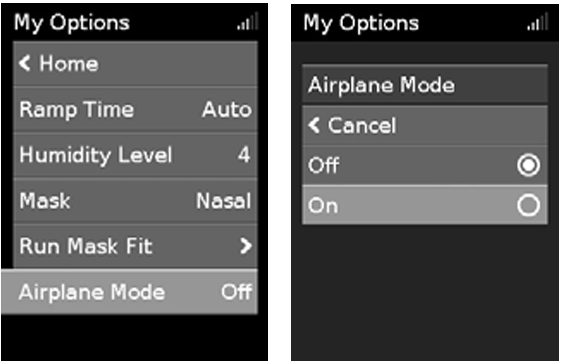
- Turn on Airplane Mode.
To turn on Airplane Mode
- In My Options, turn the dial to highlight Airplane Mode, then press the dial.
- Turn the dial to select On and press the dial to save the change.
The Airplane Mode icon ✈ is displayed at the top right of the screen.
⚠️ Caution
Do not use the device with water in the humidifier on a plane due to the risk of inhalation of water during turbulence.